

Client experience

A client coaching app, for the plan they follow.

LaunchSite OS gives clients one place for assigned training, meal plans, check-ins, progress records, and coach messages. Available on the web, iOS, and Android, with the current coaching work kept together.

Available on iOSAvailable on Android
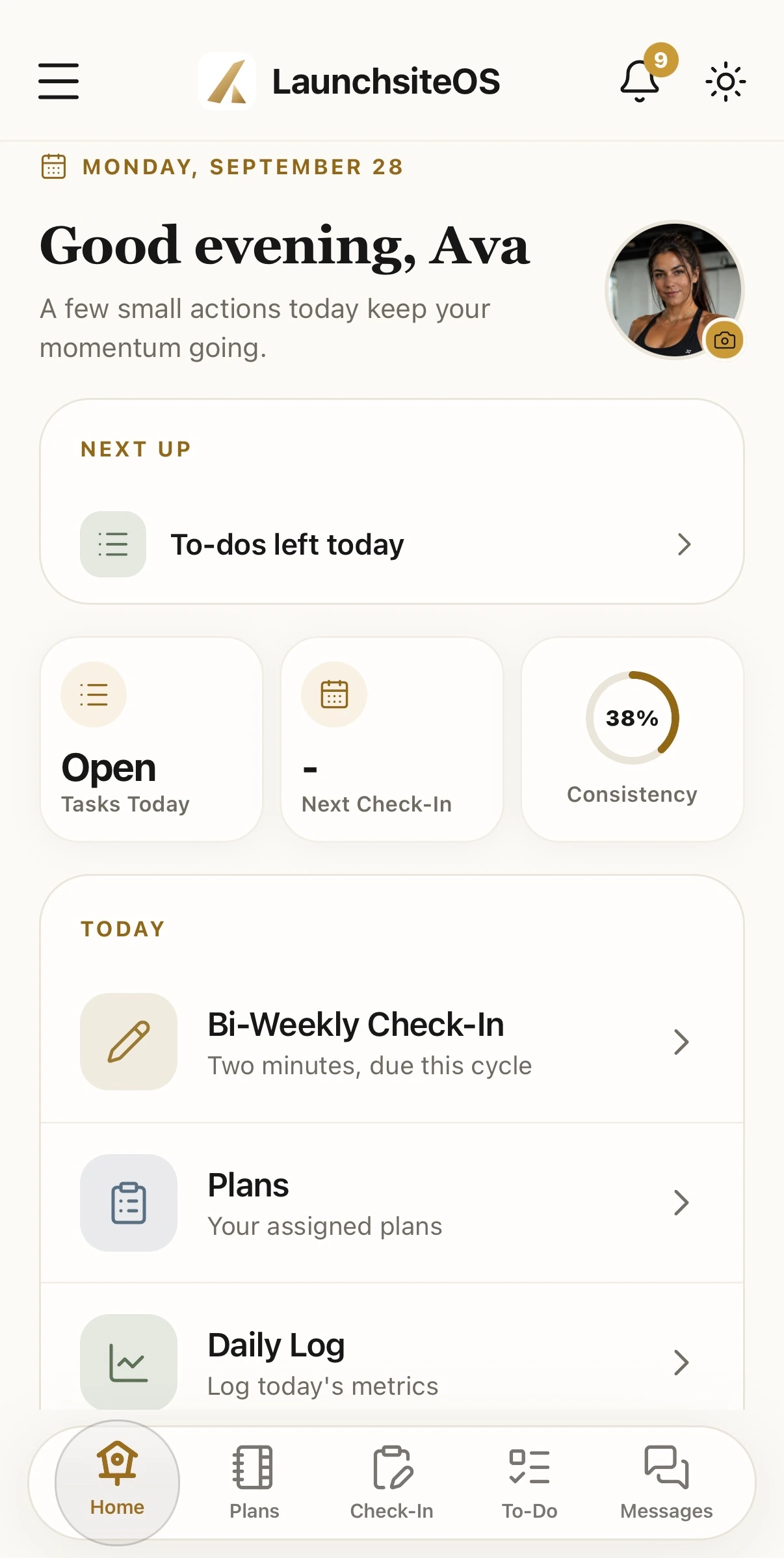
The LaunchSite OS mobile home screen showing today's actions and progress

The client home

Today is the first thingthey see.

No dashboard to interpret and no menu to learn. The check-in that is due, the plans assigned, and the metrics that matter, in the order the client needs them.

The LaunchSite OS mobile home screen showing a greeting, today's actions, and progress

Today

The day, already broken into actions.

Meals with their macros, the training block with its exercises, and every item worth points. The client works down a list instead of assembling one.

  • 01Nutrition and training on the same daily list
  • 02Per-meal calories and macros against the day’s targets
  • 03Progress counts toward optional consistency challenges

Check-ins

Reporting in feels focused, not clinical.

Clients record weight, energy, sleep, stress, and the other questions you choose on the schedule you set. You receive structured answers and their written context in the client record.

  • 01Coach-designed questions, not a fixed template
  • 02Streak visible, so consistency is its own feedback
  • 03Answers arrive attached to the plan they belong to

Plans

Everything assigned, in one place.

Nutrition, training, supplements, habits, and your written instructions. One current assignment, exportable if they want it on paper.

  • 01Every plan type in a single list
  • 02Export to PDF for the client who wants a copy
  • 03Supplements carry their own timing and dosage

Support

You are one tap from the plan they are following.

Messages, attachments, and voice notes sit inside the same app as the work, so a question about tonight's session does not move to a different channel.

  • 01Text, files, and voice notes with real notifications
  • 02Coach announcements reach the whole roster at once
  • 03The conversation stays attached to the client record

The full client surface

Everything a client can reach,and nothing they cannot.

Four groups, built so the current assignment is always obvious and the rest stays out of the way.

01

Know what to do today

The home screen keeps the current assignment visible and removes everything that does not matter right now.

Dashboard
Today’s plan, progress, reminders, and the next useful action.
Daily Log
Quick entry for weight and the coach-selected biometrics that matter.
Habits
Simple daily checkoffs for the non-negotiables in the current phase.
Calendar and booking
Upcoming sessions and self-scheduling without message back-and-forth.
02

Follow the complete plan

Every assigned program lives in one consistent mobile experience.

Meal plan
Meals, portions, macros, and coach-approved alternatives.
Supplements
A clear schedule organized by time of day.
Training plan
Week-by-week programming with sets, reps, tempo, and cues.
Library
Assigned education, resources, tools, and perks.
03

See progress clearly

Short feedback loops make consistency visible without turning wellness into noise.

Check-ins
Guided submissions and a structured coach review when it is ready.
Progress and win cards
Trends, measurements, photo comparisons, and milestone moments.
Performance League
Optional consistency-based challenges and friendly accountability.
04

Stay connected

Support lives beside the plan instead of being scattered across unrelated apps.

Messages
Text, attachments, and voice notes with real notifications.
Community
Coach announcements and shared support with the wider roster.

Both sides, one record

You are looking atthe same thing.

What the client logs is what you review. There is no export step and no reconciliation, because there was never a second copy.

The shared LaunchSite OS mobile client home and progress record

Who it fits

Built for the range of peoplea real roster holds.

Fat loss and body recompositionStrength and performanceMetabolic and functional healthLongevity and healthspanEndurance athletesPost-rehabilitation and mobilityBusy professionalsGroup and cohort programs

Good to know

Getting clients into the app

Where can clients download LaunchSite OS?

Get the client app from the App Store for iOS or Google Play for Android. Your coach must invite you before you can access their program. If your coach uses a separately branded app, follow the app link in their invitation.

Does a client create a coach account?

No. The coach invites the client to their practice. Clients follow the invitation and sign in to their own client account, where they see the programs and resources made available to them. Support can help with an invitation or sign-in problem.

Can clients use a browser instead of a phone app?

Yes. Client access is available on the web as well as the iOS and Android apps. Programs and logged records belong to the same account, so a coach can review the client’s information in the coaching workspace.

Can the experience carry my coaching brand?

LaunchSite OS offers Custom Branding options. Brand settings, domains, and a separately published coach app have different requirements and costs. Check the published plan and add-on details, or discuss a branded app with the team.

Your practice, operating clearly

Give your clients one place to open every morning.

Keep their assigned programs, progress, and coaching conversation together.